
Finding your way, without the wait.
A responsive way to reach people, chats and channels, with search depth when you need it.
- My contribution
- Product designer
- Product
- Microsoft Teams
- Scope
- Mobile & iPad
- Timeline
- 3 months (2025)
Key results
- 3destination types: people, chats and channels
- 2phone platforms: iOS and Android
Feature scope only. Measured results are in the protected case study.
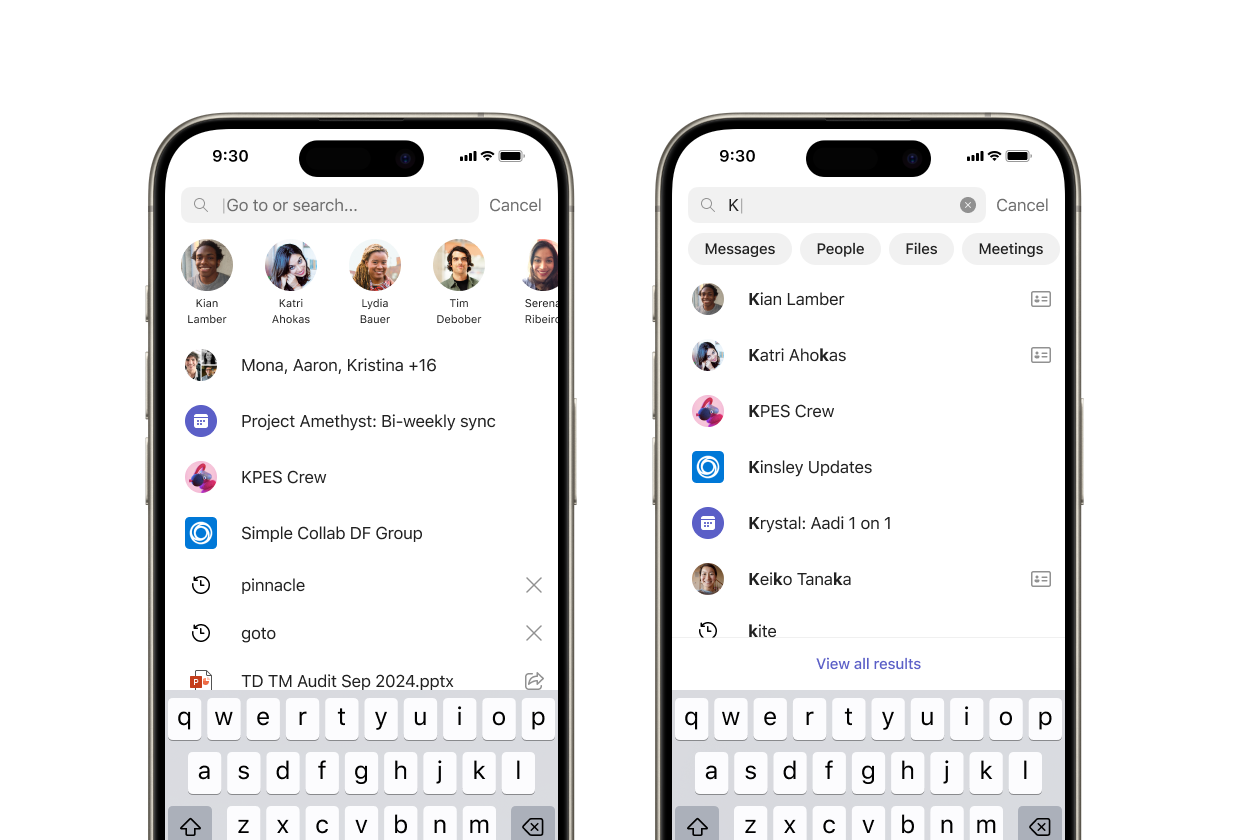
Finding something should not interrupt everything.
Search in Teams mobile often starts with a simple goal: get to a person, chat or channel. Waiting for results turns a frequent navigation task into an interruption, especially when the connection is unreliable.
Immediate navigation. Deeper retrieval.
Put familiar destinations first.
Relevant people, one-to-one conversations, group and meeting chats, and channels appear as suggestions. Familiar destinations stay within easy reach as users type.
Keep navigation resilient.
Locally available suggestions help people navigate even with a weak connection. Online search extends discovery to messages, files and destinations beyond those suggestions.
A unified navigation and search experience, available on iOS and Android.