
Less guessing. More finding.
Choose Messages or Files, then narrow the search with the context you remember.
- My contribution
- Product designer
- Product
- Microsoft Teams
- Scope
- Mobile & iPad
- Timeline
- 2 months (2026)
Key results
- 7context filters across Messages and Files, right in suggestions
- 0restarts: filters carry into full results
Shipped design scope on iOS and Android, not measured performance or business outcomes.
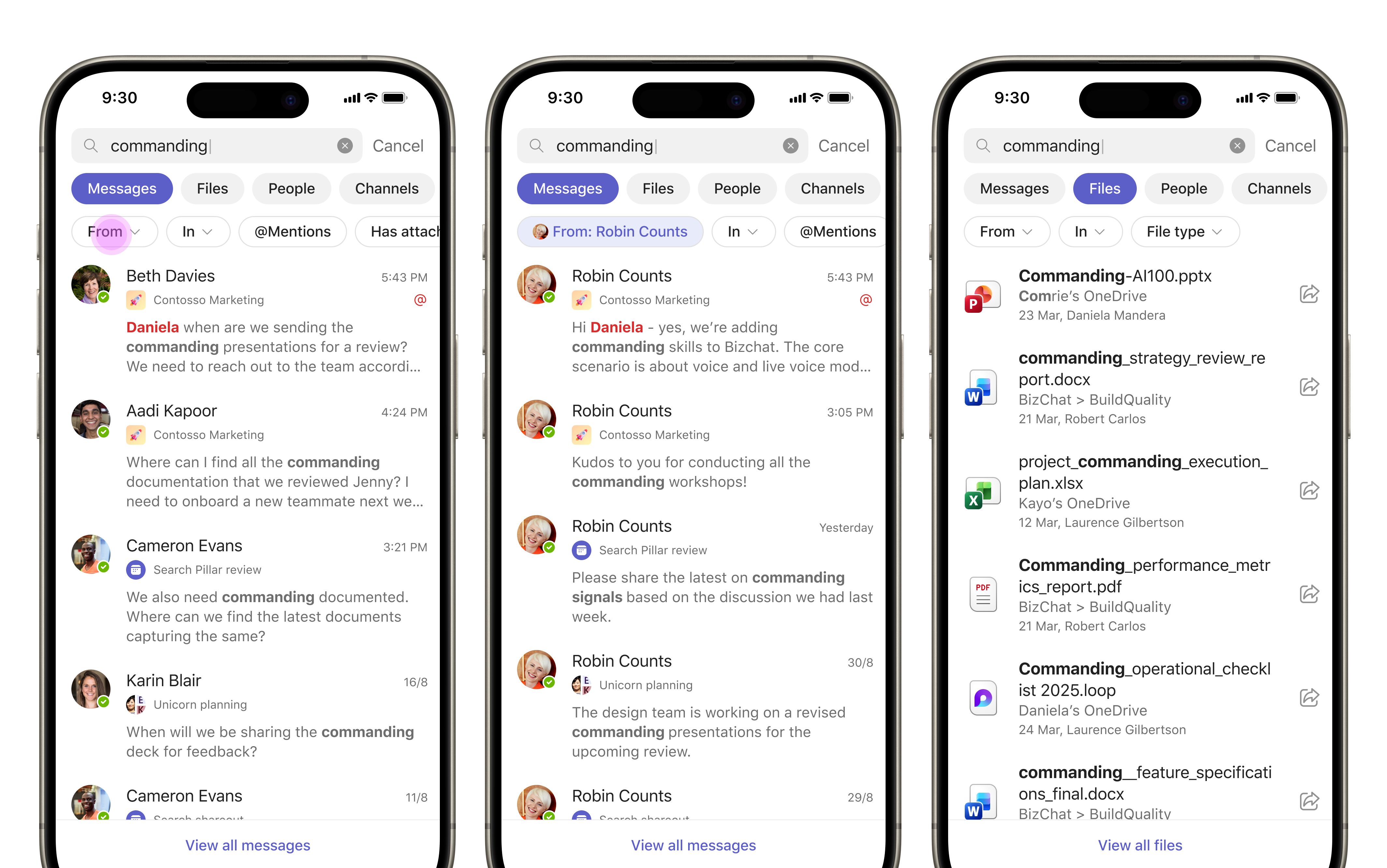
Remember the context. Not the exact words.
People looking for a message or file often remember who shared it or where, rather than the exact words. The challenge was to make those clues useful directly in search suggestions, with full results available when needed.
Refine where discovery begins.
Choose the content. Reveal the right filters.
Messages and Files act as parent categories, revealing only relevant child filters. Mentions and attachment filters belong to Messages; file Type belongs to Files. This keeps a small mobile surface focused on the task.
Make file discovery more specific.
Files exposes From, In and Type instead of message-specific choices. Supported types include Word, PowerPoint, Excel, Loop, PDF and text files.
Keep the context as you go.
Selected filters stay visible and removable, and carry from suggestions into full results, so people can continue refining without starting over.
A shared refinement model for iOS and Android: start in suggestions, choose a subfilter and continue into deeper results without losing context.